
VW Odis Online Account: How to get cheaper price?
Welcome, fellow automotive professionals Our aim at VCCarTool is to empower your workshops with the most effective and up-to-date tools available. If you’re looking to elevate your diagnostic capabilities for Volkswagen vehicles, understanding and acquiring a VW ODIS online account is a crucial step. Let’s explore the world of online diagnostics and how it can revolutionize your services. Discover seamless vehicle communication and advanced programming features designed to enhance your repair efficiency.
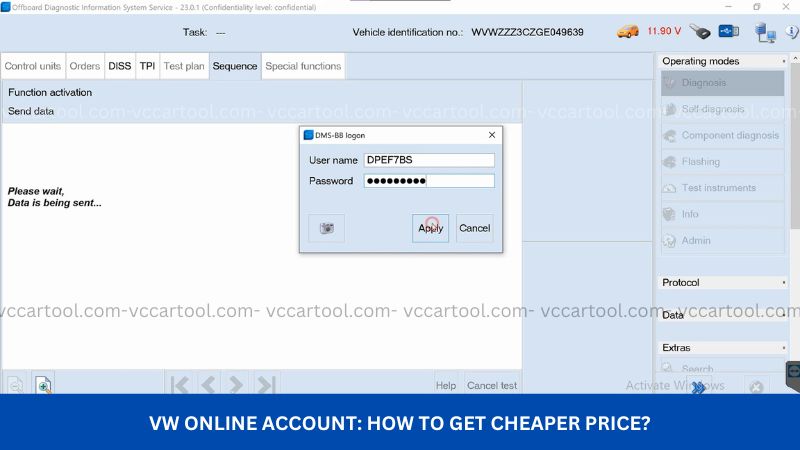
1. Understanding the Power of a VW ODIS Online Account
A VW ODIS online account grants your workshop direct access to the official Volkswagen diagnostic and programming system, ODIS (Offboard Diagnostic Information System). This sophisticated platform provides a comprehensive suite of tools and information essential for servicing modern Volkswagen vehicles. It facilitates everything from basic fault code reading and clearing to complex ECU programming and guided fault finding, ensuring you can tackle even the most intricate automotive issues with confidence. By connecting directly to Volkswagen’s servers, you gain access to the latest software updates, technical documentation, and vehicle-specific data, ensuring accurate and efficient repairs every time.
1.1 Why an Online Connection is Essential for Modern VW Diagnostics
Modern vehicles, especially those from Volkswagen, are increasingly complex, featuring intricate networks of electronic control units (ECUs) and sophisticated software. An online connection through ODIS is no longer a luxury but a necessity for several key reasons:
- Access to the Latest Data: Volkswagen continuously updates its vehicle software and diagnostic protocols. An online account ensures you always have the most current information, crucial for accurate diagnostics and repairs.
- Online Programming and Coding: Many advanced functions, such as ECU programming, software updates, and component protection activation, require an active online connection to Volkswagen’s servers for authorization and data transfer.
- Guided Fault Finding: ODIS online provides step-by-step instructions and diagnostic procedures based on real-time vehicle data, significantly simplifying complex troubleshooting processes.
- Vehicle-Specific Information: The online system can identify the exact configuration and software version of the vehicle you are working on, providing tailored diagnostic and repair information.
- Security and Anti-Theft Features: Functions like immobilizer programming and key adaptation often require secure online authentication to prevent unauthorized access.
Without a VW ODIS online account, your ability to perform comprehensive diagnostics and repairs on newer Volkswagen models will be significantly limited. You might encounter difficulties with coding new components, updating software, or accessing critical repair information, potentially leading to longer repair times and dissatisfied customers.
2. Key Benefits of Having a VW ODIS Online Account
Investing in a VW ODIS online account through VCCarTool offers numerous advantages for your automotive repair business:
2.1 Enhanced Diagnostic Capabilities
With online access, you can perform in-depth diagnostics that go far beyond basic OBD-II scanning. This includes:
- Reading and Clearing Detailed Fault Codes: Access manufacturer-specific fault codes with comprehensive descriptions and potential causes.
- Live Data Monitoring: View real-time parameters from various vehicle systems to pinpoint intermittent issues and assess component performance.
- Actuator Tests: Activate and test individual components like fuel pumps, solenoids, and relays to verify their functionality.
2.2 Streamlined Programming and Coding
The online connection enables you to perform critical programming and coding tasks efficiently:
- ECU Flashing and Software Updates: Update vehicle control unit software to the latest versions, addressing known issues and improving performance.
- Component Protection Removal: Activate or deactivate component protection on replaced parts, ensuring proper system operation.
- Parameterization and Configuration: Adapt and configure control units to match specific vehicle requirements.
2.3 Access to Official Volkswagen Information
An ODIS online account provides a direct gateway to a wealth of official resources:
- Technical Service Bulletins (TSBs): Stay informed about known issues and recommended repair procedures from Volkswagen.
- Wiring Diagrams: Access detailed electrical schematics to aid in diagnosing and repairing electrical faults.
- Repair Manuals: Obtain comprehensive step-by-step instructions for various repair procedures.
2.4 Improved Efficiency and Productivity
By providing access to advanced diagnostic and repair functionalities, an ODIS online account helps your technicians work more efficiently:
- Faster Diagnostics: Guided fault finding and real-time data analysis help pinpoint problems quickly.
- Reduced Repair Times: Efficient programming and access to accurate information minimize delays.
- Increased First-Time Fix Rate: Accurate diagnoses and proper repair procedures lead to fewer comebacks.
2.5 Enhanced Customer Satisfaction
Ultimately, the benefits of a VW ODIS online account translate to happier customers:
- Higher Quality Repairs: Access to official information and advanced tools ensures accurate and reliable repairs.
- Faster Turnaround Times: Efficient diagnostics and repairs get customers back on the road sooner.
- Demonstrated Expertise: Utilizing the same diagnostic tools as authorized dealerships enhances your shop’s credibility.
3. Requirements for Obtaining a VW ODIS Online Account
To access the full capabilities of VW ODIS online, you typically need the following:
- ODIS Compatible Diagnostic Tool: A diagnostic interface that is compatible with the ODIS software. VCCarTool can advise you on suitable options.
- Stable Internet Connection: A reliable and high-speed internet connection is essential for communication with Volkswagen’s servers.
- Windows-Based Computer: The ODIS software is generally designed to run on a Windows operating system. Specific version requirements may apply.
- Valid VW ODIS Online Account Credentials: This requires registration and often involves a subscription or pay-per-use model. VCCarTool offers convenient access options.
- GeKo Access (for Security-Related Functions): For certain security-sensitive procedures like key programming and immobilizer work, GeKo (Geheimnis- und KomponentenSchutz – Secrecy and Component Protection) authorization is necessary. This often involves a separate application process and verification of your credentials as a legitimate automotive professional.
4. How to Get a VW ODIS Online Account with VCCarTool
VCCarTool simplifies the process of accessing VW ODIS online, providing flexible and cost-effective solutions tailored to your workshop’s needs. Here’s how you can get started:
4.1 Contact VCCarTool for Consultation
Reach out to our knowledgeable team via Whatsapp at +1 (901) 414 – 1927 or visit our website at vccartool.com. We will discuss your specific requirements, the volume of Volkswagen work your shop handles, and recommend the most suitable ODIS online access plan for you.
4.2 Choose Your Access Option
VCCarTool offers various access options to suit different needs and budgets:
| Service | Description | Pricing | Suitable For |
| Per-VIN Access (Pay-as-you-go) | Access ODIS online for a specific vehicle identification number (VIN). Includes initial CP/Immo setup (first 10 minutes) and subsequent SVM coding (up to 50 minutes). | $55 – $60 per VIN | Workshops with occasional VW diagnostics |
| Daily/Custom Rental | Rent ODIS online access for a specified period (e.g., daily) or request a customized duration. | Contact for pricing | Workshops with fluctuating or project-based needs |
Contact us for detail via WhatsApp: +1 (901) 414 – 1927
4.3 Provide Necessary Information
Depending on the chosen access method, you may need to provide information such as your workshop details and the VIN of the vehicle you are working on.
4.4 Secure Payment
VCCarTool offers secure and convenient payment options for your ODIS online access.
4.5 Receive Your Login Credentials
Once your payment is processed, VCCarTool will provide you with the necessary login credentials and instructions to access the VW ODIS online system.
4.6 Start Diagnosing and Repairing
With your active ODIS online account, you can immediately begin performing advanced diagnostics, programming, and accessing valuable repair information for Volkswagen vehicles.
5. Optimizing Your Workshop with VCCarTool’s Support
At VCCarTool, we understand the challenges faced by automotive technicians and garage owners. The physical demands of the job, constant exposure to grease and chemicals, the need to stay updated with rapidly evolving automotive technology, and the pressures of time and competition are all significant concerns. Furthermore, finding and investing in high-quality tools that meet your specific needs can be a daunting task.
That’s where VCCarTool steps in as your trusted partner. We provide not just tools, but solutions designed to improve your work efficiency, reduce repair times, increase accuracy and safety, and ultimately boost your revenue and profitability. By offering seamless access to powerful diagnostic platforms like VW ODIS online, we empower you to deliver superior service and enhance your garage’s reputation.
Imagine the confidence of tackling complex Volkswagen repairs with the same level of access and information as authorized dealerships. Picture your technicians working more efficiently, resolving issues faster, and reducing the likelihood of errors. Envision your customers experiencing quicker turnaround times and higher quality repairs, leading to greater satisfaction and loyalty.
Ready to transform your Volkswagen diagnostic capabilities? Contact VCCarTool today via WhatsApp at +1 (901) 414 – 1927 or visit vccartool.com to explore our VW ODIS online account options and discover how we can help your workshop thrive. Our friendly and knowledgeable team is ready to answer your questions and guide you towards the best solution for your business. Don’t let outdated tools hold you back – embrace the power of online diagnostics with VCCarTool.
By partnering with VCCarTool, you gain access to reliable tools, expert support, and a commitment to your success in the competitive automotive repair industry. Let us help you overcome the challenges of modern vehicle diagnostics and unlock the full potential of your workshop. Get in touch now and experience the VCCarTool difference.
You can also use offline diagnostic and coding software for VAG at: VAG Diagnostic Tool